
Attorneys are required to file all documents and pleadings electronically, except as provided in the Local Rules and Standing Orders of the Court, or as ordered by the judge. Instructions on this process can be found here.
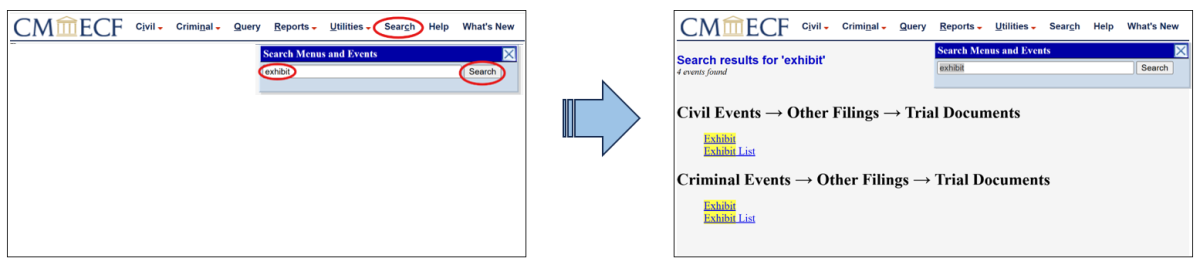
CM/ECF offers a Search function to assist with filings.
To use this function enter one word such as “exhibit” and CM/ECF will display the category events for Exhibit.
Pro se litigants can visit our Self Representation page for information about how to file. Whenever possible, filings should be submitted through EDS.
Litigants who wish to submit a paper for the Court’s consideration should submit the document to the Clerk of Court for filing. Pleadings should not be sent directly to the District Judge or the Magistrate Judge assigned to your case.
All documents filed via CM/ECF are automatically date and time stamped. If you are submitting a filing in paper format and you require a date stamped copy of a pleading, you are required to submit a copy of the pleading, accompanied by self-addressed, stamped envelope, at the time of filing. Note: The Clerk’s Office will not date stamp copies of pleadings, unless the paper filing is submitted in this manner.
Common Pleadings and Where to File Them
• Exhibit: Civil – Trial Documents - Exhibit
• Corporate Disclosure Statement: Civil – Discovery Documents – Disclosure Statement Form 7.1
• Report of Rule 26(f) Meeting: Civil – Other Documents – Report of Rule 26(f) Planning Meeting
• Substitution of Counsel: Civil – Notices – Notice (Other)
Note: The entering attorney must file the substitution of counsel
• Proposed Order: Civil – Notices – Notice (Other)
Pleadings that are NOT Filed
The following pleadings are not filed pursuant to Local Civil Rule 26.1 – Discovery:
• Requests for Production of Documents;
• Requests for Production of Documents;
• Requests for Admissions;
• Interrogatories;
• Answers to Interrogatories;
• Notices of Deposition; and
• Depositions.